
Ask the AI assistant
Open the floating assistant to ask about contacts, or to make the same changes an MCP agent can: notes, lanes, Queue, promises, and more.
The assistant answers from your contact profiles and memory notes: phones, emails, history, and draft suggestions. See Contact profiles for where that data lives.
It also uses the same tools as the Memlane MCP server. You can ask it to read data and to make changes in the app: search contacts, update contact card fields (name, company, phones, emails, addresses, birthday), update notes, move people on lanes, log connections, work the Queue, add or close promises, manage Gather, update your writing style, and more. You do not need a separate agent for those edits. For an external agent (Grok, Cursor, and others), see Connect an AI agent with MCP.
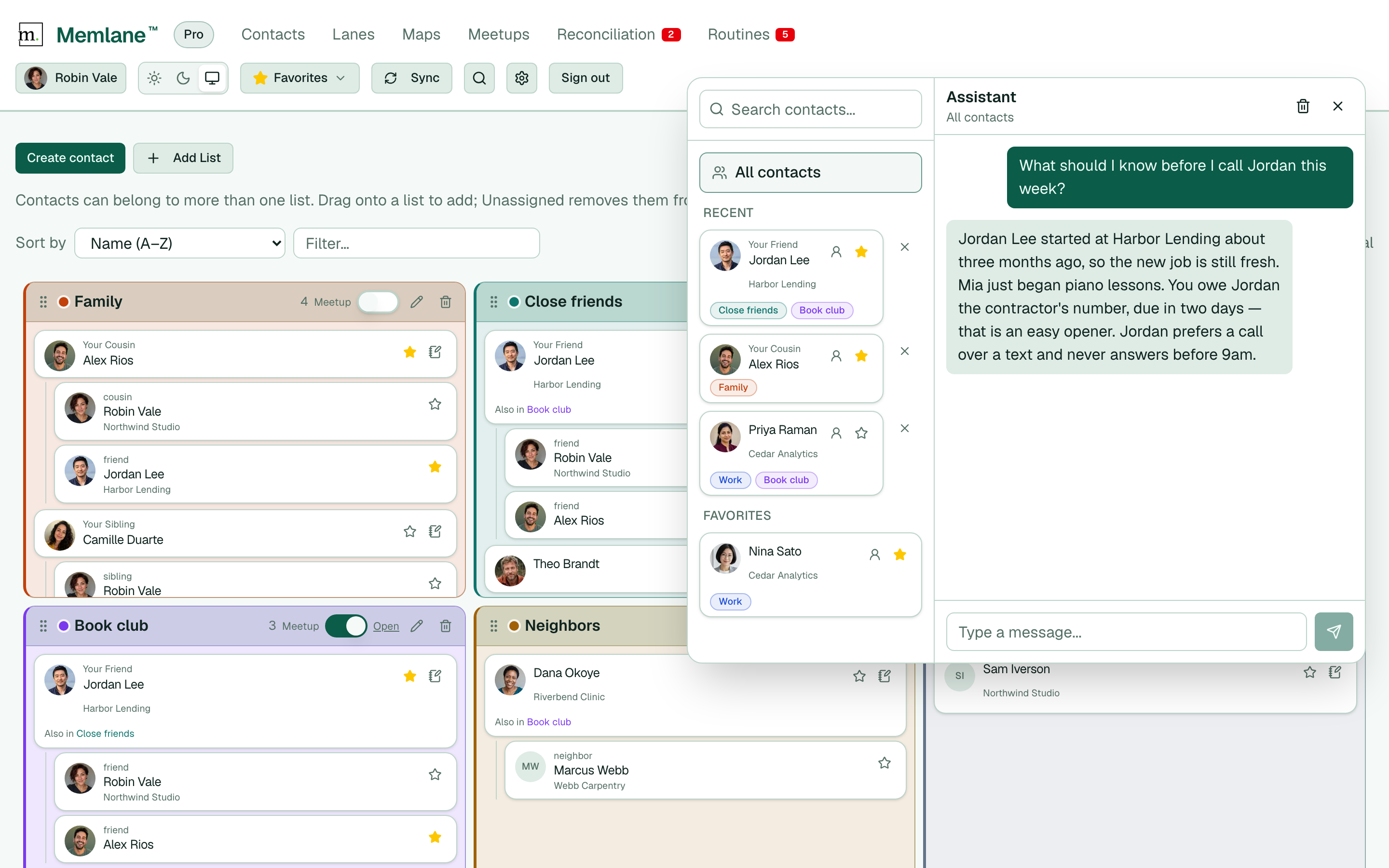
- Choose Ask AI Assistant in the header (smaller screens) or the floating button at the bottom right.
- On a contact’s page, Memlane selects that person. Or pick someone under Recent or Favorites, or search.
- Each person in the list shows the Contact lists they belong to, which helps you tell two similar names apart.
- For a network-wide question, choose All contacts.
- Type in Type a message... and send. Ask about notes, history, or how to reach out. Ask Help me improve my contacts for ranked outreach and cleanup steps (not a contact dump). Or ask it to change something: update a phone or address, log a connection, move someone on a lane, save a note, close a promise, or update your writing style. Contact names in replies are links — tap or click to open that person. The assistant panel stays open.
- On a desktop, drag the panel edges or corners to resize. Memlane remembers the last size for the next visit.
- On a contact’s page, choose Prepare next to the favorite star for a one-tap sync-up brief. See Prepare for a sync-up.
- When the assistant is about to change something (save a note, update a contact, update writing style, and similar), use Yes or No under the reply (or type the same words). Changes run only after Yes.
- After a change, Memlane lists each change under the reply, for example a new promise or a move on a lane. Choose Open to see it, or Undo to reverse it. If you edited the item after the assistant did, the row shows Changed since and Undo stops, so your edit stays. Contact list changes show Open only. See Undo an AI assistant change.
- Choose Reset chat in the header when you want a fresh thread (for example after the assistant gains new capabilities).
- If something goes wrong, choose Report a problem under the message box. See Get help.
Free includes 10 chats per UTC week; Memlane Pro includes 200. See Membership in Settings and account for your count and the Free limits list, or upgrade in Memlane Pro.